
Understanding the Dual-Wallet System on BitLease
Understanding the Dual-Wallet System on BitLease
BitLease is built around a dual-wallet architecture designed to support your structured path to digital asset ownership. Every account contains two distinct wallet spaces: the FUNDING Wallet and the LTO Wallet, each serving a specific purpose in your Lease-to-Own (LTO) journey.
This is not a trading platform. The wallet design reflects BitLease’s focus on structured ownership, ensuring clarity and control at every step.
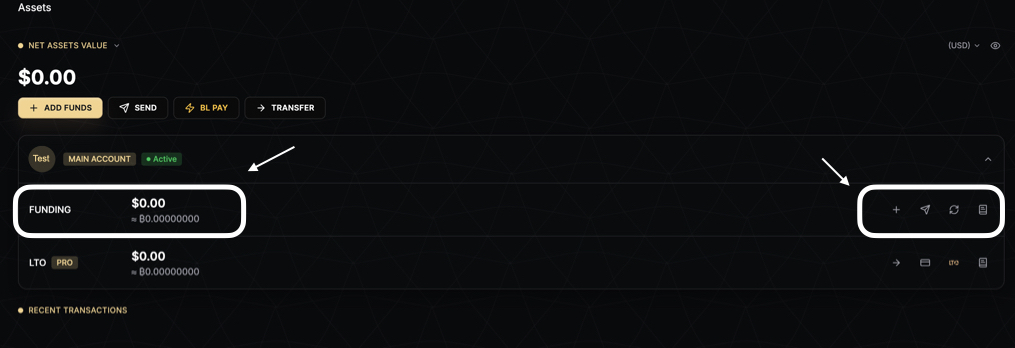
FUNDING Wallet — Your Starting Point
The FUNDING Wallet is where every user journey begins. It functions like a standard financial account, enabling you to deposit, manage, and withdraw assets. All LTO contracts are funded from the FUNDING Wallet, and once your down payment is confirmed, the relevant assets move into the LTO Wallet to begin the contract lifecycle.
What the FUNDING Wallet Supports
Deposits:
Fiat or stablecoin deposits via on-chain transfer.
Crypto deposits connected through institutional custody.
Swaps:
Convert between fiat, stablecoins, and cryptocurrencies using the Convert feature.
Installment Payments:
Pay installments for active LTO contracts.
Receiving Free Assets:
Transfer Free Assets from your LTO Wallet back to FUNDING.
Withdrawals:
Send assets to external wallets (subject to AML/KYT compliance checks).
Internal Transfers:
Send assets to other BitLease users via BL Pay.
LTO Wallet — Your Contract Space
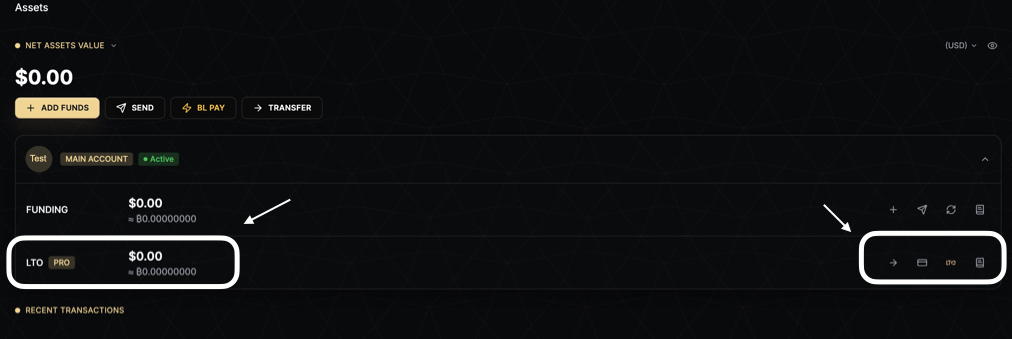
The LTO Wallet is activated when you open your first LTO contract. It does not exist as an active space until a contract requires it. Inside the LTO Wallet, your assets exist in one of two states: Locked Assets or Free Assets.
Locked Assets
Locked Assets are held under active LTO contracts and are protected by institutional-grade security. These assets cannot be moved until the contract conditions are met.
Key Features of Locked Assets:
Non-Transferable: Cannot be moved during the contract term.
Non-Withdrawable: Locked until the contract is fully settled or terminated.
MPC Custody: Protected under Non-User-Signatory Multi-Party Computation (MPC) custody.
Economic Utility Rights: You retain full rights to price appreciation and eligible staking yield.
Release Conditions: Assets are released only after Full Settlement or a Termination Event.
Free Assets
Free Assets in the LTO Wallet are fully accessible and can be used for various purposes.
How Free Assets Arrive in the LTO Wallet:
Staking Rewards: Earned through LTO Staking Delegation.
Surplus Assets: Returned after a Termination Event.
Installment Completion: Fully released after completing all installments.
Incentives: Cashback or rewards credited to your account.
What You Can Do with Free Assets:
Pay installments directly.
Transfer to your FUNDING Wallet.
Withdraw to external wallets.
How to Add Funds to Your FUNDING Wallet
The FUNDING Wallet is the starting point for all activity on BitLease. Before opening a lease or making any payment, you need funds available in this wallet.
For detailed instructions, see How to add Funds
Deposit Methods
1. On-Chain Deposit
Send cryptocurrency from any external wallet directly to your FUNDING Wallet. This method is processed through Fireblocks institutional custody.
Important Notes:
Verify the network before sending.
Sending assets on an incorrect network may result in permanent loss.
Ensure your KYC verification is complete before depositing.
2. BL Pay — Internal Transfer
BL Pay allows you to receive crypto from another BitLease user instantly, with no network fees or confirmation wait time.
How It Works:
Share your BitLease account identifier with the sender.
Once the transfer is initiated, your FUNDING Wallet balance updates immediately.
Note: BL Pay transfers only work between verified BitLease accounts. External wallets cannot send through BL Pay.
How to Send and Withdraw from Your FUNDING Wallet
You can move assets out of your FUNDING Wallet in two ways:
On-Chain Withdrawal:
Transfer crypto to any external wallet address.
Withdrawals are subject to AML/KYT compliance review.
BL Pay — Send to Another BitLease User:
Instantly send crypto to another verified BitLease user.
No network fees apply, and the transfer settles immediately.
For more details, see How to Withdraw Funds.
Important Notes:
You can only send and withdraw assets from your FUNDING Wallet.
Locked Assets in your LTO Wallet cannot be sent or withdrawn during an active contract.
Free Assets in your LTO Wallet must first be transferred to FUNDING before they can be sent or withdrawn.
How to Transfer Between Your FUNDING and LTO Wallets
The TRANSFER function moves assets between your two internal wallets: FUNDING and LTO. Transfers are processed instantly, with no network fees.
When Would You Need to Transfer?
Funding Installments:
Transfer from FUNDING to LTO to top up your LTO Wallet before an installment payment is due.
Accessing Free Assets:
Transfer Free Assets from LTO to FUNDING to access staking rewards or surplus assets after a contract closes.
Key Rules:
Installments are paid exclusively from the LTO Wallet.
If your LTO Wallet does not have sufficient balance, you must manually transfer from FUNDING before the due date to avoid penalties.
Automatic Payments:
When enabled, installments are deducted automatically from your LTO Wallet balance.
Automatic Payments do not auto-transfer from FUNDING to LTO.
Payment Source Order (Automatic Payments):
USDT LTO
USDC LTO
USDT Funding
USDC Funding
Need Help?
If you encounter issues with your wallets, contact BitLease Support:
Email: support@bitlease.com
Subject: "Wallet Configuration Issue"
Include: A description of the problem, any error messages, and steps you’ve already tried.
Response Time: Within 24 hours.
For urgent security concerns, email: security@bitlease.com.
This guide ensures you can confidently manage your FUNDING and LTO Wallets, enabling a seamless Lease-to-Own experience on BitLease.