
LTO Wallet
Understanding the LTO Wallet
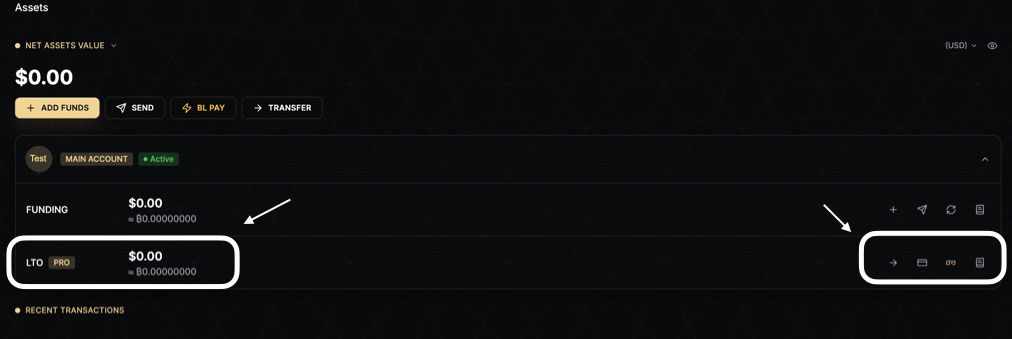
The LTO Wallet is a specialized wallet on BitLease designed to manage assets tied to active Lease-to-Own (LTO) contracts. It operates with a dual-state custody system, ensuring that your assets are securely managed throughout the Lease → Use → Own cycle.
What is the LTO Wallet?
The LTO Wallet is where assets under active LTO contracts are held. It is distinct from the Funding Wallet and is specifically designed to manage assets you are acquiring through installment payments. The wallet operates with two asset states: Locked Assets and Free Assets.
Key Features of the LTO Wallet
1. Dual-State Custody System
The LTO Wallet operates with two distinct asset states:
Locked Assets: Assets tied to active contracts and non-transferable until full ownership is achieved.
Free Assets: Assets that are withdrawable or usable for new contracts.
This system ensures that your assets are securely managed while providing flexibility for assets that are no longer bound by contract terms.
2. Locked Assets
Locked Assets are contract-bound and remain non-transferable during the contract term.
Key Characteristics:
Contract-Bound: Restricted until 100% ownership is achieved.
Non-Transferable: Cannot be withdrawn, sent, or swapped.
MPC-Custodied: Secured with institutional-grade Multi-Party Computation (MPC) custody for maximum security.
Lock Duration:
Assets remain locked for the entire contract term. Once all payments are completed, they convert to Free Assets.
3. Free Assets
Free Assets are withdrawable and can be used for new contracts or payments.
Key Characteristics:
Staking Rewards: Yield from LTO staking delegation.
Termination Surplus: Remaining value after contract obligations are settled.
Released Assets: Assets unlocked after completing all contract payments.
How to Use Free Assets:
Withdraw: Transfer to external wallets via on-chain withdrawal.
Apply to New Contracts: Use as down payments or installment payments for other LTO contracts.
How to Use the LTO Wallet
Transferring Funds
To transfer funds between wallets:
Navigate to the Assets page.
Click the TRANSFER button.
Choose the direction of the transfer:
Funding → LTO: Move funds to the LTO Wallet for installment payments.
LTO → Funding: Transfer Free Assets back to the Funding Wallet.
Enter the amount and confirm the transfer.
For more information, see How to Transfer Funds.
Viewing Locked Assets
To view your Locked Assets:
Navigate to the Owning section.
Check the detailed breakdown of your locked assets, including:
Current market value.
Your equity percentage (ownership stake).
Remaining payment obligations.
Progress toward 100% ownership.
Full Settlement Process
When you complete all installment payments, Full Settlement occurs automatically.
What Happens:
Final payment is made.
The platform confirms payment.
The contract closes.
Locked Assets convert to Free Assets.
You achieve 100% ownership.
After Full Settlement:
Free Assets appear in your LTO Wallet.
You can withdraw, transfer, or use them for new contracts.
Benefits of the LTO Wallet
Security: Locked Assets are protected with institutional-grade MPC custody.
Transparency: Provides a clear view of your locked and free assets, payment obligations, and ownership progress.
Flexibility: Free Assets can be withdrawn or used for new contracts.
Control: You manage transfers between the LTO and Funding Wallets.
Next Steps
To learn more about managing your accounts, check out these related articles:
Need Help?
If you encounter any issues with your LTO Wallet, contact BitLease Support:
Email: support@bitlease.com
Subject: "LTO Wallet Issue"
Include: A description of the problem, any error messages, and steps you’ve already tried.
Response Time: Within 24 hours.
For urgent security concerns, email: security@bitlease.com.
This guide ensures you can confidently manage your assets and navigate the LTO Wallet to track your ownership journey.