
Funding Wallet
Understanding the Funding Wallet
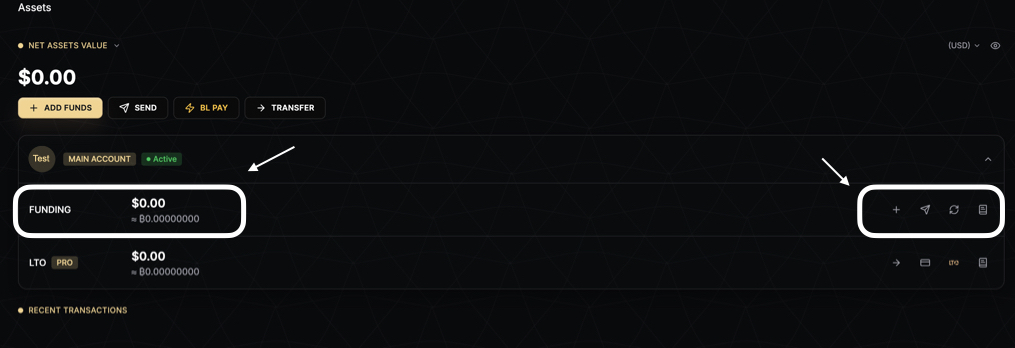
The Funding Wallet is your operational wallet on BitLease, designed to handle liquid assets for all platform activities. It provides a secure and isolated space for managing deposits, payments, swaps, and withdrawals, ensuring you have full control over your liquid funds.
What is the Funding Wallet?
The Funding Wallet is where your liquid capital resides. It is fully independent of the LTO Wallet, allowing you to manage your operational funds without interference from active contracts. This separation ensures clarity and security in your financial activities.
Key Features of the Funding Wallet
1. Purpose
The Funding Wallet is your go-to wallet for all platform operations. It primarily holds stablecoins (e.g., USDT, USDC) and supports the following activities:
Deposits: Add funds to your account via on-chain transfers or BL Pay.
Payments: Use funds for LTO contract down payments, monthly installments, and platform fees.
Swaps: Convert between supported currencies.
Withdrawals: Transfer funds to external wallets or other BitLease users.
2. Fully Isolated Design
The Funding Wallet operates independently from the LTO Wallet. This isolation ensures:
Your operational funds are protected from contract obligations.
A clear distinction between liquid assets and assets tied to active contracts.
3. Asset State: Always Withdrawable
All assets in the Funding Wallet are fully liquid and under your control. You can:
Withdraw: Transfer funds to external wallets via on-chain withdrawal.
Send: Use BL Pay to send funds to other BitLease users.
Hold: Keep funds in the wallet without restrictions or timeframes.
How to Use the Funding Wallet
Adding Funds
To add funds to your Funding Wallet:
Navigate to the Assets page.
Click the + ADD FUNDS button.
Choose your deposit method:
On-Chain Deposit: Transfer USDT or USDC from an external wallet.
BL Pay: Receive funds from another BitLease user.
Confirm the transaction.
For detailed instructions, see How to Add Funds.
Sending or Withdrawing Funds
To send or withdraw funds:
Navigate to the Assets page.
Click the SEND button.
Choose your withdrawal method:
On-Chain Withdrawal: Transfer funds to an external wallet.
BL Pay: Send funds to another BitLease user.
Enter the amount and confirm the transaction.
For more details, see How to Withdraw Funds.
Swapping or Converting Assets
To swap between supported currencies:
Navigate to the Assets page.
Click the CONVERT button.
Select the currencies you want to swap (e.g., USDT to USDC).
Enter the amount and confirm the conversion.
Transferring Funds
To transfer funds between wallets:
Navigate to the Assets page.
Click the TRANSFER button.
Choose the direction of the transfer:
Funding → LTO: Move funds to the LTO Wallet for installment payments.
LTO → Funding: Transfer Free Assets back to the Funding Wallet.
Enter the amount and confirm the transfer.
For more information, see How to Transfer Funds.
Benefits of the Funding Wallet
Liquidity: All assets are immediately accessible for withdrawals, payments, or swaps.
Security: Operates independently from the LTO Wallet, ensuring your liquid funds are protected.
Flexibility: Supports multiple operations, including deposits, withdrawals, and conversions.
Transparency: Provides a clear view of your available funds and transaction history.
Next Steps
To learn more about managing your accounts, check out these related articles:
Need Help?
If you encounter any issues with your Funding Wallet, contact BitLease Support:
Email: support@bitlease.com
Subject: "Funding Wallet Issue"
Include: A description of the problem, any error messages, and steps you’ve already tried.
Response Time: Within 24 hours.
For urgent security concerns, email: security@bitlease.com.
This guide ensures you can confidently manage your liquid funds using the Funding Wallet.