
Understanding Market Order and Limit Order in the LTO Deal Builder
Understanding Market Order and Limit Order in the LTO Deal Builder
The LTO Deal Builder on BitLease allows users to create Lease-to-Own (LTO) positions with two order types: Market Order and Limit Order. These options provide flexibility in how you initiate your LTO contracts, depending on your strategy and market conditions.
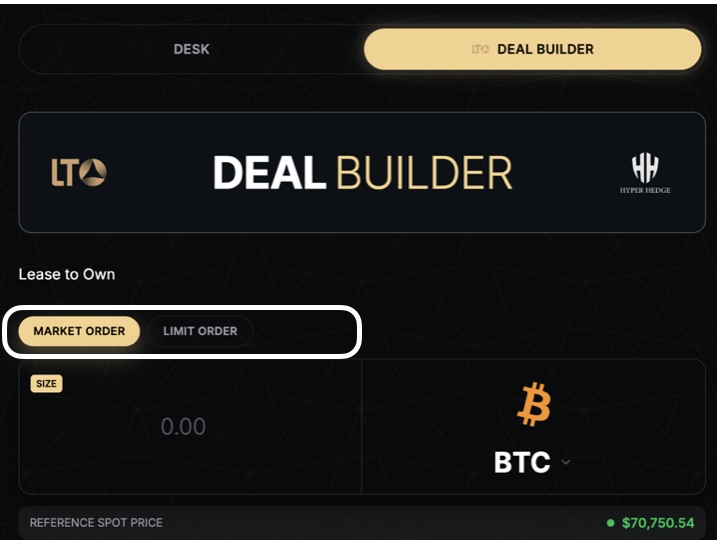
Market Order
A Market Order executes your LTO contract immediately at the current market price of the selected cryptocurrency. This is the fastest way to start owning crypto through the Lease-to-Own model.
Key Features of Market Order
Immediate Execution:
The contract is activated instantly at the live market price.
No waiting for price changes or conditions to be met.
Simplicity:
Ideal for users who want to secure their LTO position quickly without monitoring price fluctuations.
Reference Spot Price:
The live market price is displayed in the "REFERENCE SPOT PRICE" field.
For example, in the screenshot, the current price of Bitcoin (BTC) is $70,750.54.
How It Works:
Select Market Order in the Deal Builder.
Enter the Size (amount of cryptocurrency you want to lease).
Confirm the details and proceed to activate the contract.
When to Use Market Order
You want to secure your LTO position immediately.
You are comfortable with the current market price.
You don’t want to wait for specific price conditions.
Limit Order
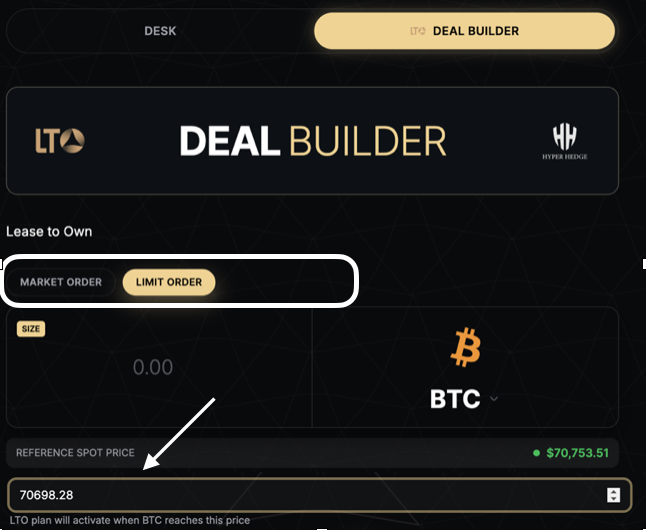
A Limit Order allows you to set a target price at which your LTO contract will activate. The contract will only execute if the market price reaches or falls below your specified limit price.
Key Features of Limit Order
Price Control:
You define the price at which the LTO contract should activate.
For example, in the screenshot, the user has set a Limit Price of $70,698.28, which is below the current market price of $70,753.51.
Conditional Execution:
The contract remains pending until the market price matches your specified limit price.
If the price doesn’t reach your limit, the order will not execute.
Reference Spot Price:
The current market price is displayed in the "REFERENCE SPOT PRICE" field for comparison.
How It Works:
Select Limit Order in the Deal Builder.
Enter the Size (amount of cryptocurrency you want to lease).
Specify the Limit Price (the price at which the contract should activate).
Confirm the details and wait for the market to reach your target price.
When to Use Limit Order
You want to lease cryptocurrency at a specific price lower than the current market price.
You are willing to wait for the market to reach your target price.
You want more control over the cost of your LTO position.
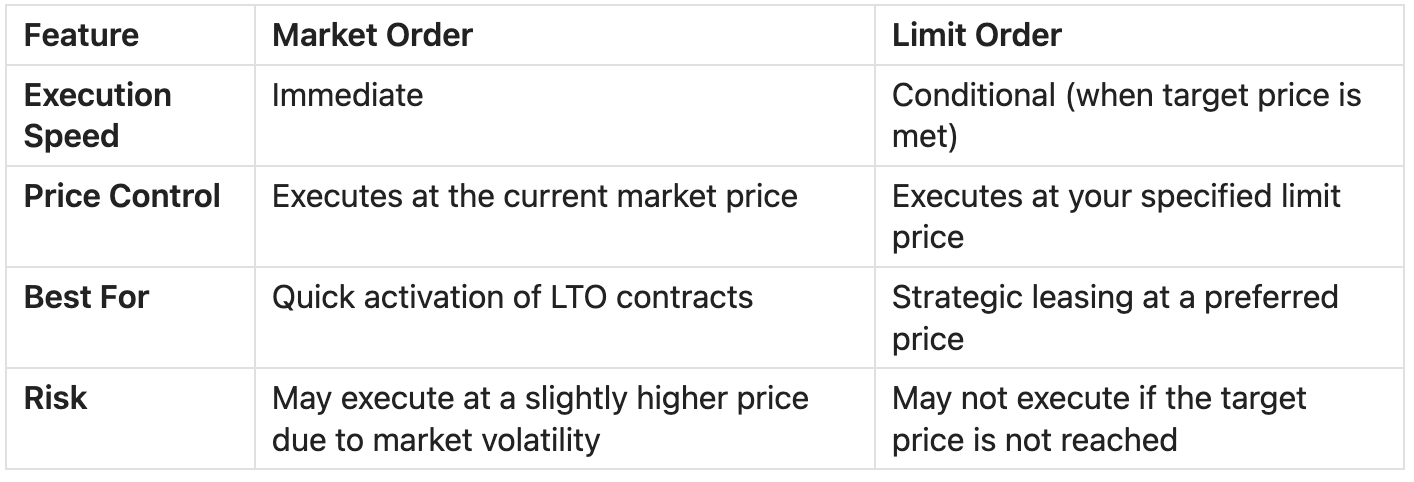
Comparison: Market Order vs. Limit Order
How to Use Market and Limit Orders in the LTO Deal Builder
Step 1: Access the Deal Builder
Navigate to the PLAN section in the main menu.
Click on LTO DEAL BUILDER.
Step 2: Select Order Type
Choose between Market Order or Limit Order using the selector.
The active selection is highlighted (e.g., Limit Order is highlighted in gold in the screenshot).
Step 3: Configure the Order
Market Order:
Enter the Size (amount of cryptocurrency to lease).
Review the Reference Spot Price (current market price).
Confirm and activate the contract.
Limit Order:
Enter the Size (amount of cryptocurrency to lease).
Specify the Limit Price (target price for activation).
Review the Reference Spot Price for comparison.
Confirm and wait for the market to reach your target price.
Step 4: Monitor Your Order
Market Orders execute immediately, and the LTO position becomes active.
Limit Orders remain pending until the market price matches your specified limit price.
Important Notes
Reference Spot Price: Always check the live market price displayed in the "REFERENCE SPOT PRICE" field before placing your order.
Pending Limit Orders: If the market price doesn’t reach your limit price, the order will remain pending and won’t activate.
Market Volatility: Market Orders may execute at a slightly higher or lower price due to rapid price changes.
Need Help?
If you encounter issues with Market or Limit Orders, contact BitLease Support:
Email: support@bitlease.com
Subject: "LTO Order Issue"
Include: A description of the problem, any error messages, and steps you’ve already tried.
Response Time: Within 24 hours.
For urgent security concerns, email: security@bitlease.com.
This guide ensures you can confidently use Market and Limit Orders in the LTO Deal Builder to create Lease-to-Own positions tailored to your strategy.