
How Leasing Works on BitLease
How Leasing Works on BitLease
Leasing on BitLease operates on a Lease-to-Own (LTO) model, enabling you to acquire cryptocurrency through structured installment payments. Instead of purchasing crypto outright, you can lease digital assets and gradually build ownership over time through regular payments.
What Makes LTO Different
The Lease-to-Own model on BitLease offers a unique approach to crypto acquisition:
No Collateral Required: Start owning crypto without putting up assets as security.
Structured Payment Plans: Choose from multiple term lengths and payment schedules.
Gradual Ownership: Build equity with each payment you make.
Full Ownership Rights: Gain complete control once the lease term is completed.
The LTO Process
1. Choose Your Asset
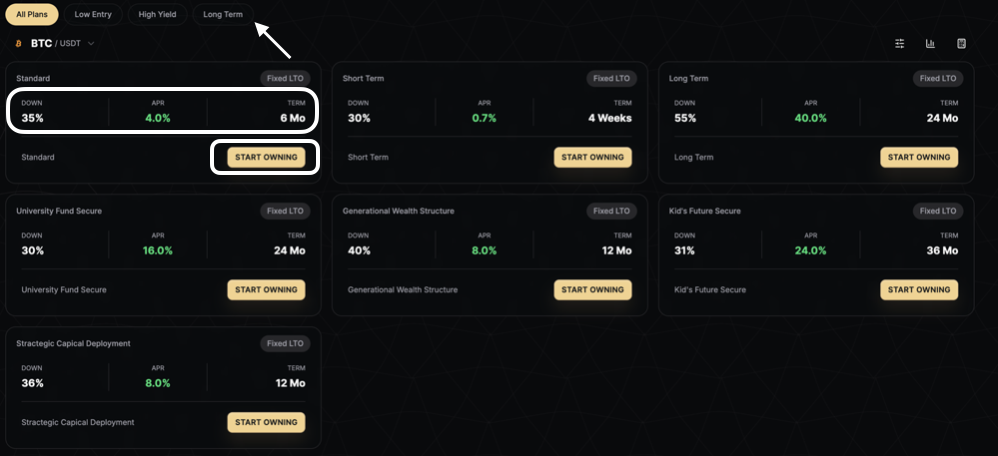
Browse available cryptocurrencies in the PLAN section. BitLease offers a variety of assets, including BTC, ETH, SOL, and more.
2. Select a Plan
BitLease provides multiple pre-structured plans with varying terms:
Standard Plans: 6-month terms with moderate down payments (35% down, 4.00% APR).
Short Term Plans: 4-week terms with lower entry points (30% down, 0.7% APR).
Long Term Plans: 24-month terms for extended ownership building (55% down, 40.0% APR).
Specialized Plans: Options like University Fund Secure, Generational Wealth Structure, Kid's Future Secure, and Strategic Capital Deployment.
Each plan displays three key metrics:
DOWN: Initial down payment percentage.
APR: Annual Percentage Rate.
TERM: Length of the lease period.
3. Customize with Advanced Filters
Use the Advanced Filters to refine your search for plans that match your preferences:
all plans.jpg
Down Payment: Adjust from 0% to 100%.
Term (Months): Select durations from 0 to 60 months.
Max APR: Set your maximum acceptable rate up to 100%.
4. Review Plan Categories
Plans are organized by investment strategy:
All Plans: View everything available.
Low Entry: Plans with lower down payment requirements.
High Yield: Plans offering higher APR returns.
Long Term: Extended lease periods for sustained growth.
5. Use the LTO Calculator
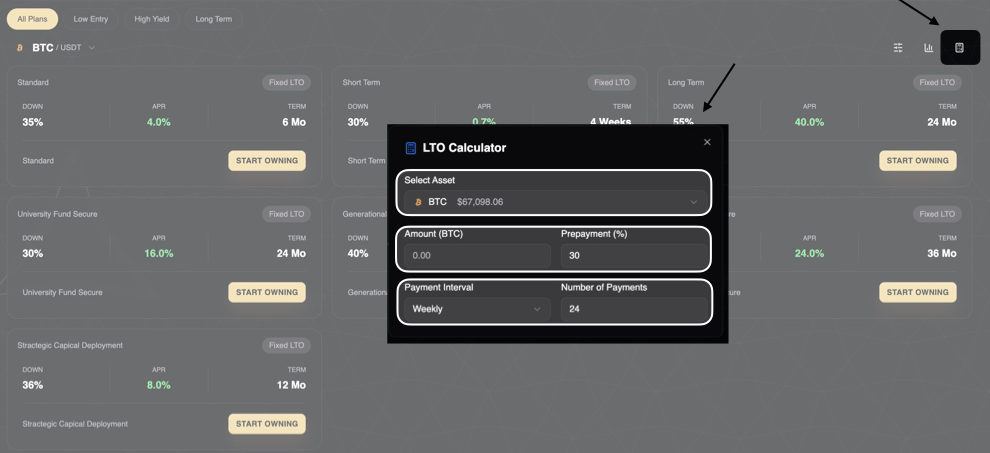
Plan your lease with precision using the LTO Calculator tool:
lto calculator.jpg
Select Asset: Choose your cryptocurrency.
Amount: Specify the quantity to lease.
Prepayment (%): Set your down payment percentage.
Payment Interval: Choose Weekly or Monthly payments.
Number of Payments: Define the total payment count.
Two Ways to Create an LTO Position
Option 1: Start from Pre-Structured Plans
Navigate to the PLAN section in the main menu.
Browse available Fixed LTO packages.
Filter by Low Entry, High Yield, or Long Term categories.
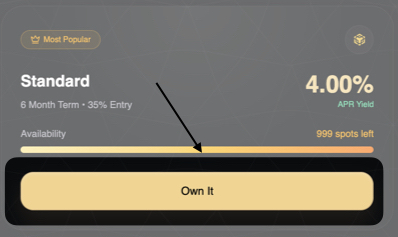
Click START OWNING on your chosen plan.
Complete the quantity and payment setup.
Option 2: Build Your Own with Deal Builder
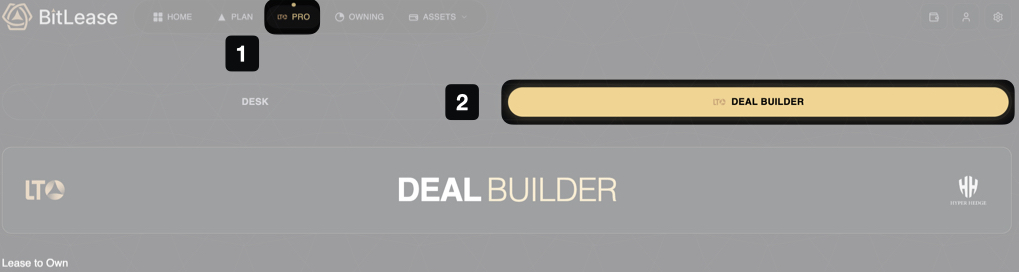
Access the DEAL BUILDER feature for complete customization:
Select Order Type:
Market Order: Execute immediately at the current market price.
Limit Order: Set a target price; the LTO activates when reached.
Enter Position Size:
Specify the amount of cryptocurrency to lease.
Select Asset:
Choose the cryptocurrency (e.g., BTC).
The live price appears in green beside the asset selector.
Configure Down Payment:
Use the slider to set your down payment (20% to 60%).
Configure Repayment Schedule:
Select Weekly or Monthly intervals.
Choose a contract term (3M, 6M, 12M, 18M, or 24M).
Review Deal Summary:
View a complete cost breakdown, including fees and total cost.
Click Review and Sign Deal to proceed.
For more information, see Understanding Market Order and Limit Order in the LTO Deal Builder
Need Help?
If you encounter issues with your Leasing and contact BitLease Support:
Email: support@bitlease.com
Subject: "Leasing Issue"
Include: A description of the problem, any error messages, and steps you’ve already tried.
Response Time: Within 24 hours.
For urgent security concerns, email: security@bitlease.com.